
Free edition
Custom ONNX detection and segmentation, live preview, profiles, controller and supported hardware output, and the Official Aim Testing Suite.
Premium includes every feature in Free. Advanced controls extend the same capture, detection, tracking and movement foundation.
Custom ONNX detection and segmentation, live preview, profiles, controller and supported hardware output, and the Official Aim Testing Suite.
Every Free feature, plus advanced targeting, motion compensation, the desktop overlay, training tools and optional API Suite access.
| Capability | Free | Premium |
|---|---|---|
| New in 0.1.9-A | ||
| Games navigation and illustrated personal Profiles; Games catalog initially empty, official defaults added as supplied | Included | Included |
| Top-bar tuning lock, precise numeric entry and contextual guide links | Included | Included |
| Model-specific class aliases and local support bundles | Included | Included |
| Independent horizontal/vertical assistance and acquire/retain confidence | Included | Included |
| Visual aiming anchors, pixel capture regions and aiming-point exclusion zones | Included | Included |
| Optional calibrated crosshair reference; off by default, screen-centre fallback | Included | Included |
| Inference GPU selection and supported CPU execution placement | Included | Included |
| Controller thresholds and output dead-zone compensation | Included | Included |
| Process resource diagnostics and the Misc activity hub | Included | Included |
| Collection limits, advanced training settings and validation curves | Unavailable | Included |
| Local annotation batching and optional CUDA annotation on supported hardware | Unavailable | Included |
| Additive labels, manual polygons and model-assisted box/mask annotation | Unavailable | Included |
| API examples, confirmed local annotation/training jobs and optional session observation sharing | Unavailable | Included |
| Capture & models | ||
| Monitor/window capture, centered crops, offsets and capture rates | Included | Included |
| Capture/inference rates, frame skipping, ONNX threading and expert numeric entry | Included | Included |
| Custom ONNX model library, import/change and inspection controls | Included | Included |
| DirectML default, CPU fallback, explicit CUDA and optional TensorRT RTX | Included | Included |
| Automatic output-layout inspection, letterbox/stretch and dynamic input fallback | Included | Included |
| Confidence, NMS, class filters and maximum detections | Included | Included |
| Label maps, output formats and model output handling | Included | Included |
| GPU preprocessing option; CUDA graph requests fall back to standard execution | Included | Included |
| ONNX instance segmentation with prototype masks and live mask visuals | Included | Included |
| Configurable mask threshold, decode limit and model handling | Included | Included |
| On-demand acceleration component installation | Included | Included |
| Official Models: Detection or Segmentation, then game/program and model | Included | Included |
| Provider benchmarking | Included | Included |
| Portrait/rotated capture correction and native model-unit override | Included | Included |
| Model and provider changes load when you choose Start | Included | Included |
| Extended performance history | Unavailable | Included |
| Target policy & tracking | ||
| Selection strategy | Highest detection confidence | Closest to center, highest confidence, largest, smallest or lowest movement |
| Snap, near, acquisition and retention radii | Included | Included |
| Circular or rectangular FOV zones and target anchors | Included | Included |
| Lock persistence, lost-target hold and switching margin | Included | Included |
| Minimum track age, watchlists and target recovery | Included | Included |
| Tracking continuity and occlusion recovery | Included | Included |
| Anchor smoothing and exact-center settle radius | Included | Included |
| Target-policy simulation | Included | Included |
| Lost-track prediction with noise, speed, acceleration and distance bounds | Unavailable | Included |
| Per-class target priorities and anchors | Unavailable | Included |
| Manual target pin and release | Unavailable | Included |
| Input & output | ||
| Keyboard, mouse and controller activation with controller tester | Included | Included |
| Optional Xbox-compatible controller output | Included | Included |
| Relative mouse and virtual mouse output options | Included | Included |
| Screen-centre aiming by default, with manual capture-relative offsets and optional crosshair detection | Included | Included |
| MAKCU v1/v2, KMBox Net and KMBox A movement output | Included | Included |
| Serial HID bridge for supported Arduino, RP2350 and Teensy boards | Included | Included |
| Safeguards, gain, max-step, dead zone, smoothing and output rate | Included | Included |
| Dedicated low-latency Win32 mouse timing worker | Included | Included |
| Output direction inversion and response curve | Linear only | Linear or quadratic |
| Snap-radius click/hold actions with physical priority and default activation gate | Unavailable | Included: click or hold action |
| Motion compensation preset library/editor with automatic, shared-drift and combined correction | Unavailable | Included |
| Compensation activation modes: hold, click-once, constant and automatic | Unavailable | Included |
| Compensation calibration wizard | Unavailable | Included |
| Control or Observe-only session mode with native output authority | Included | Included |
| API Suite workspace control with authenticated command IDs and bounded status reporting | Unavailable | Included: Premium only, optional |
| Premium LAN API transport | Unavailable | HTTPS with exported local public certificate; loopback unchanged |
| Visuals & workspace | ||
| Live annotated preview with box, label, confidence, track, anchor, FOV and mask controls | Included | Included |
| Overview, compact grouped navigation and persistent quick profile switcher | Included | Included |
| Twelve themes with distinct backgrounds and translucent workspace panels | Included | Included |
| Centered readable settings and color-bar sliders | Included | Included |
| Profiles, default ready-to-run profile and status diagnostics | Included | Included |
| Synchronized profile loading, atomic saves and rolling capture/inference/output metrics | Included | Included |
| Reduced repeated catalog work and repaired translation/tooltip binding | Included | Included |
| Setup and calibration wizard with rerunnable activation binding | Included | Included |
| Overview readiness cockpit, settings search and profile comparison | Included | Included |
| Privacy-conscious JSON session reports | Included | Included |
| English, Mandarin Chinese, German, Russian and French interface | Included | Included |
| Bundled HTML guide in English, Chinese, German, Russian and French | Included | Included |
| Click-through desktop overlay and full Overlay Editor with colors, layout, opacity, status, boundaries and motion guides | Unavailable | Included |
| Annotated PNG snapshots | Unavailable | Included |
| Extended local performance history | Unavailable | Included |
| Hotkey profiles with named global Windows hotkeys | Unavailable | Included |
| Anonymous aggregate telemetry during active capture with user opt-out | Included | Included |
| Activation-gated clean training collection | Visible, unavailable | Included |
| Background annotation using a selected library ONNX model with detection, instance-segmentation labels and repeat agreement | Visible, unavailable | Included |
| UINT8 model input support | Included | Included |
| Corrected small, end-to-end and raw multi-class dataset decoding | Visible, unavailable | Included |
| Class-name-safe annotation mapping with manual-class preservation | Visible, unavailable | Included |
| Separate agreement image views, recoverable label replacement and review invalidation | Visible, unavailable | Included |
| Cancellable dataset lifecycle with retry and close recovery | Visible, unavailable | Included |
| Unique ZIP exports, quoted YAML names and stricter training preflight | Visible, unavailable | Included |
| Instance-segmentation training annotations | Visible, unavailable | Included |
| Cancellable/restartable visual review with live boxes, classes, hotkeys, zoom and accept/exclude states | Visible, unavailable | Included |
| Official Aim Testing Suite with saved preferences, custom characters and reports | Included | Included |
| Bounded preview, telemetry and dataset delivery with stale-observation handling | Included | Included |
| Validated YOLO dataset split, data.yaml and ZIP packaging | Visible, unavailable | Included |
| Optional local Ultralytics runtime, training controls, progress and ONNX export/integration | Unavailable | Included: optional, user-triggered install |
Additional acceleration and training components may be installed when selected. Included components vary by edition and release. Supported application permissions and hardware compatibility remain environment-dependent.
Choose your editionReleased desktop client / 0.1.8-A.3
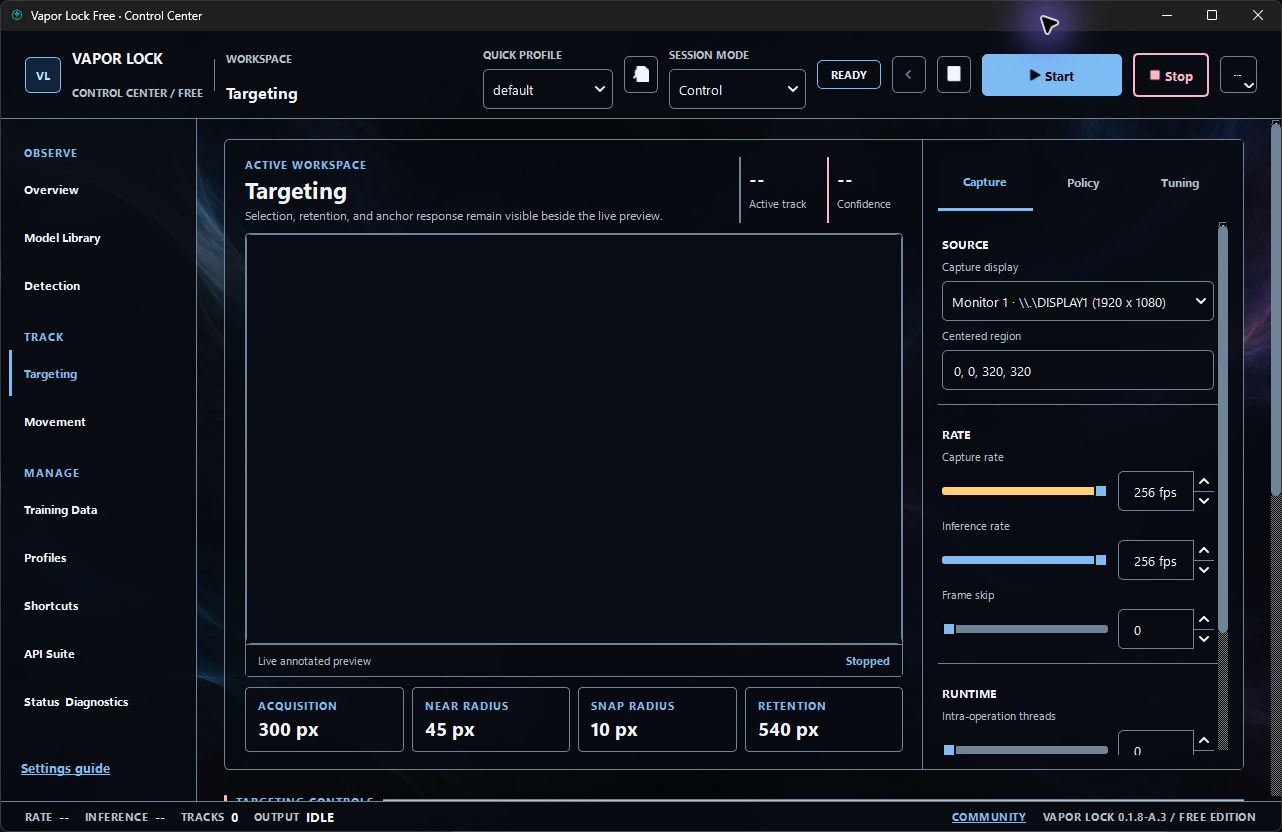
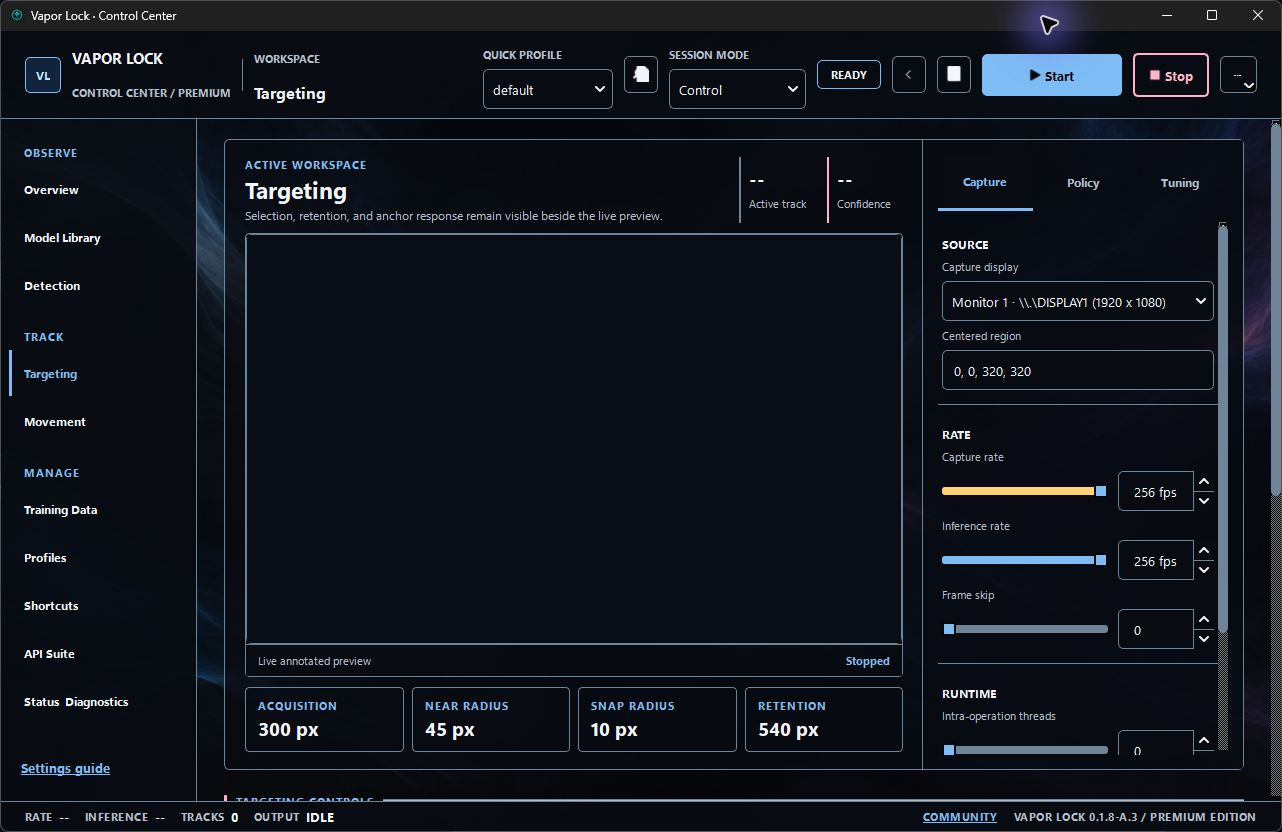
Open testing grounds from Overview as a separate workspace. It does not start capture or arm movement automatically. Suite preferences, custom characters and reports persist across updates, giving each edition a repeatable place to tune a model, sensitivity, capture region and selected transport.
Use controller activation, optional Xbox output or supported movement adapters. Xbox output is opt-in and may require Windows approval; external hardware adapters send movement only, and untested boards or firmware are not guaranteed. DirectML is the automatic default, CPU is the fallback, CUDA is explicit, and compatible NVIDIA systems can install TensorRT on demand.
Premium includes an optional authenticated local API Suite for personal dashboards, plugins, companion tools and trusted remote control. It covers workspace sessions and modes, settings, profiles, model inspection/validation/benchmarking, compensation, overlays, snapshots, target lock and emergency stop. Starting local annotation or training jobs through the API requires confirmation in the native app. Authenticated clients can check job status and request cancellation. Detailed observation results, including detection boxes, require a separate opt-in for the current session; stale results expire automatically. Stop, profile/model changes or license loss turn sharing off. Preview pixels, activation data, private paths and hardware identifiers are not returned. The in-app self-describing schema and Discord /apiinfo support path provide integration guidance. Optional Premium LAN API access requires HTTPS with an exported local public certificate; loopback API access is unchanged. Accepted API POST commands return acommand_id; GET /api/v1/commands/:command_idreports bounded in-memory status for ten minutes. Aqueued status means the GUI has not handled the command yet, applied or rejected resolves a settings batch, and dispatched means the existing handler received another action, not that later asynchronous work has finished. Invalid enum settings apply nothing.
Both editions include twelve themes and bundled HTML guides in English, Chinese, German, Russian and French. Open the Settings guide link at the bottom of the left navigation for setup instructions, a topic index and language links. The interface includes translated setup screens and standard dialogs.